Audit file viewer
Open an XAF file in your browser, view the trial balance and ledger detail and convert it to Excel. Nothing is uploaded.
With the Accountant role
With the Accountant role you work in your client's books with your own login: bookings, the ledger, the VAT return and questions to your client. It costs you and your client nothing extra, and you don't need a subscription of your own.
Not ready for a trial yet? Open an audit file in the free viewer: no account and no upload.
Do you run your clients' books as an accounting firm? Your firm pays from €9 per managed administration per month, excluding VAT, with no fixed firm fee.
Your client invites you in booxx under Team, with the Accountant role. If you don't have an account yet, you set a password through the email; if you already have one, this client is added to it.
You pick the client in the client switcher at the top and then work in their books: booking, managing the ledger, preparing the VAT return, putting periods up for review and viewing the activity log. Everyone picks their own language: you Dutch, for example, your client Polish, on the same figures.
From invitation to first booking
Who does what in your client's books
| You, with the Accountant role | Your client, the owner | |
|---|---|---|
| Bookings and the ledger | Yes | Yes, if they want to |
| Preparing the VAT return | Yes | Yes |
| Questions about bank transactions | Asks them and closes them | Answers them, and can ask a question too |
| Team and subscription | No | Yes |
| Sending payments | No | Yes |
| Screen language | Own choice, for example Dutch | Own choice, for example Polish |
| Cost | No subscription of your own needed | Own subscription; the Accountant role costs nothing extra |
| Ending access | Give up access, on the My clients page | Withdraw access, under Team |
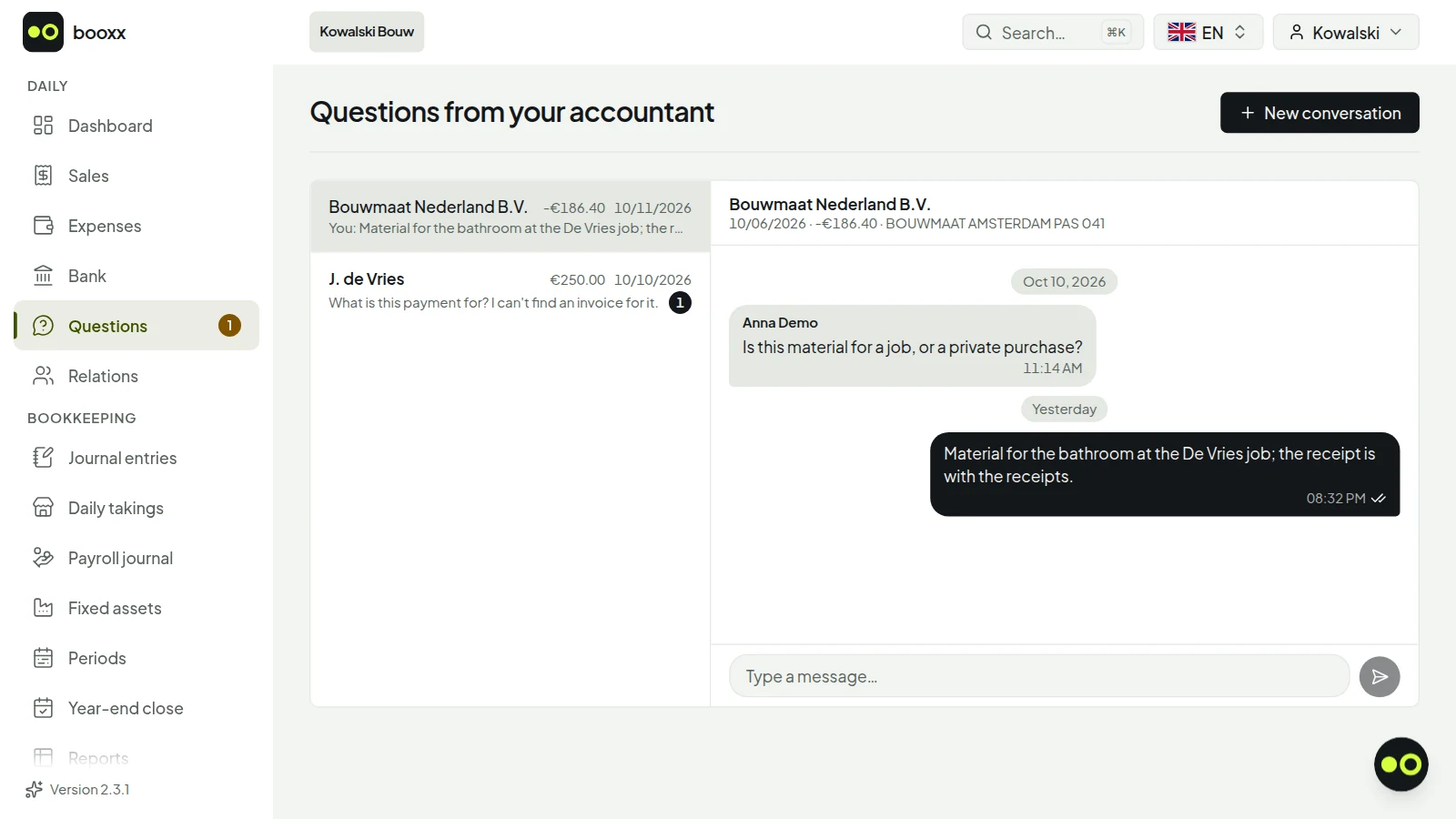
If you can't place a bank transaction, you start a conversation about it under Questions for your client. A question without a transaction works too. Your client sees it on their dashboard and in the menu, with the screen in their own language, and answers in the same conversation. If there is already a conversation about that transaction, your message goes into it. Once everything is clear, you close the conversation. If you write in Dutch and your client uses the software in another language, they read your message translated, and you read their reply in Dutch. It is a machine translation; the original is one click away.
Then you don't have to switch to get the figures. Under Reports you download the audit file (XAF) for a financial year: the complete journal in the standard format for Dutch books, as XAF 4.0 or 3.2. Whether your own package reads that file in differs per package. For the income tax or corporate income tax return there is the Tax software export, an RGS bridge statement for Nextens, Avanzer Aangifte or Fiscaal-online.nl.
What a package does with an audit file from another package, according to its own help pages:
| SnelStart | According to its own knowledge base, it does not read in another package's export (or an .xaf audit file) and names an external service that can. Importing entries does work, from an Excel file. |
|---|---|
| Moneybird | Does not mention the audit file. According to the help centre, importing existing books in one go is not possible: you start with an opening balance or enter old data retroactively. |
| Nmbrs Accounting (formerly Yuki) | Reads in historical data from before the start date from the XAF audit file (version 3.0 onward) of almost any accounting package. |
| AFAS SB | Reads in an audit file (XAF 3.2 or 4.0) when a new administration is started and names Profit, Twinfield, Exact Online, Multivers and SnelStart for that; according to AFAS other packages will follow later. It reads in comparative figures from any package that exports XAF 3.2. |
| Caseware Cloud | Reads in XAF 3.1 or 3.2, so choose XAF 3.2 when you download. |
Which package reads in an audit file?Moving clients overChoosing software for your firm
Every client who invites you is added to the same login. If you keep the books for more clients, a firm environment is often handier: one worklist across all your clients, sorted by what is urgent, with your own team and permissions per employee. On the My clients page the link appears as soon as you have two or more clients.
Open the files you get from clients, without an account and without uploading them anywhere.
Open an XAF file in your browser, view the trial balance and ledger detail and convert it to Excel. Nothing is uploaded.
Open MT940 and CAMT.053 files in your browser, check the balances and convert the transactions to Excel. Nothing is uploaded.
Convert a CSV export from your bank into an MT940 file for your accounting software, free and in your browser. Nothing is uploaded.
Open a UBL invoice (.xml) readably in your browser, recalculate it and convert the lines to Excel. Nothing is uploaded.
No. You don't need a subscription of your own. Your client pays their own subscription, and the Accountant role costs them nothing extra; they can also invite more than one.
Yes. Every user picks their own language out of five: Dutch, English, Polish, Hungarian or Romanian. You book in Dutch, your client sees the same books in their own language, including the names of the ledger accounts. You choose your own language with the language switcher at the top right; that choice applies only to you and is remembered.
In the client switcher at the top. Every client who invites you is added to the same login. If you already have an account for your own books, the client is added there too.
Yes, since 18 October 2026. In your client's administration you choose Submit to Belastingdienst; the return goes through Digipoort in your client's name, and the EC Sales List and supplementary returns go the same way. You confirm with your own password. Filing as an intermediary is not possible from your client's administration, and a return you filed outside the package can't be recorded as filed there. It is possible if you run your clients in your own firm environment: there you turn on We file with our own tax software under Firm › Tax returns.
On the My clients page, choose Give up access for that client. Your client can also withdraw your access themselves under Team. Both take effect immediately, and your own account stays.
From €9 per managed administration per month, excluding VAT. In a firm environment your firm creates the client and your firm pays for that administration, not the client. The rate per administration goes down the more you run; the lowest rate applies to large firms. There is no fixed firm fee and no price per staff member. You pay pro rata: per administration for the days it was active. Under Firm › Costs you see what the current month has cost so far and how many more administrations you need for a lower rate; when you add a client or administration, you see before creating it how your monthly costs change. If a client with their own subscription invites you with the Accountant role, you pay nothing. If you have a firm environment, such a client can also give your whole firm access: he pays for it himself, does not count towards your tier and still appears in your worklist.
Yes. With the Accountant role you connect Claude, ChatGPT or another assistant through MCP to the client you have open, or choose all clients you can access; the latter can only read. The agent can never do more than you. If the client revokes your access, the agent immediately loses it too.
booxx.nlYour books, in your own language
Want to see how the package handles the books first? Start a trial with your own firm's administration. You then see the package the way your client sees it, and on your dashboard you request the firm environment with the worklist: you enter how many clients you have and in which languages, and we set it up.
90 days free, then €19 a month · no payment method needed · cancel any month
From €9 per managed administration per month, excluding VAT. No fixed firm fee, no price per staff member.