A firm environment where you run all your client administrations from one worklist, under Dutch rules — while your client reads his own books and answers your questions in Polish, Hungarian, Romanian or English.
Want to see how the package handles the books first? Start a trial with your own firm's administration. You then see the package the way your client sees it; for the firm environment with the worklist, send us an email.
We set up a firm environment together with you. If you work on your own with a few clients, you don't need one: your client invites you as Bookkeeper. For bookkeepers
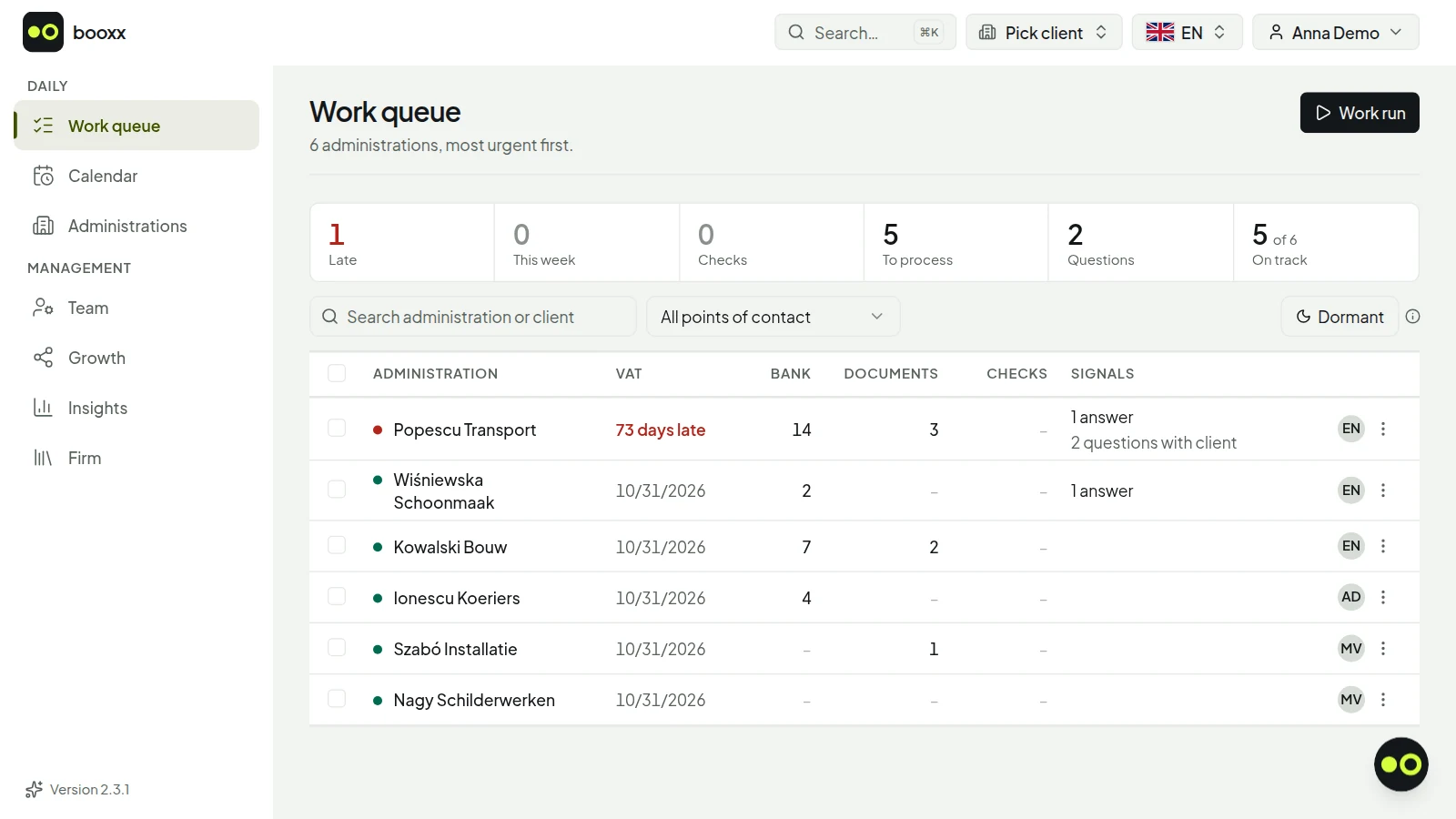
The worklist with six sample clients: the client with an overdue VAT return at the top, the client with nothing open at the bottom. On the right are the initials of the point of contact. Screenshot with demo data.
The worklist with six sample clients: the client with an overdue VAT return at the top, the client with nothing open at the bottom. On the right are the initials of the point of contact. Screenshot with demo data.
Which accounting software suits a Dutch accounting firm with foreign clients?
Software in which the bookkeeping is Dutch and the screen doesn't have to be. In booxx, an accounting firm runs all its client administrations from one worklist, sorted by urgency: VAT deadlines, bank lines still to be matched, documents waiting for validation, red reconciliation checks and open questions. The ledger follows the Dutch reference chart of accounts (RGS) and the VAT worksheet follows the boxes of the Dutch tax office (Belastingdienst), but every user picks their own language: Dutch, English, Polish, Hungarian or Romanian. Your staff member books in Dutch; your Polish client sees the same administration in Polish, including the names of the ledger accounts.
What your firm gets
One worklist by urgency
Per administration the VAT deadline, the bank lines still to be matched, the documents waiting for validation, red reconciliation checks and open questions. The most urgent sits on top, and clicking a counter filters the list.
Permissions per staff member
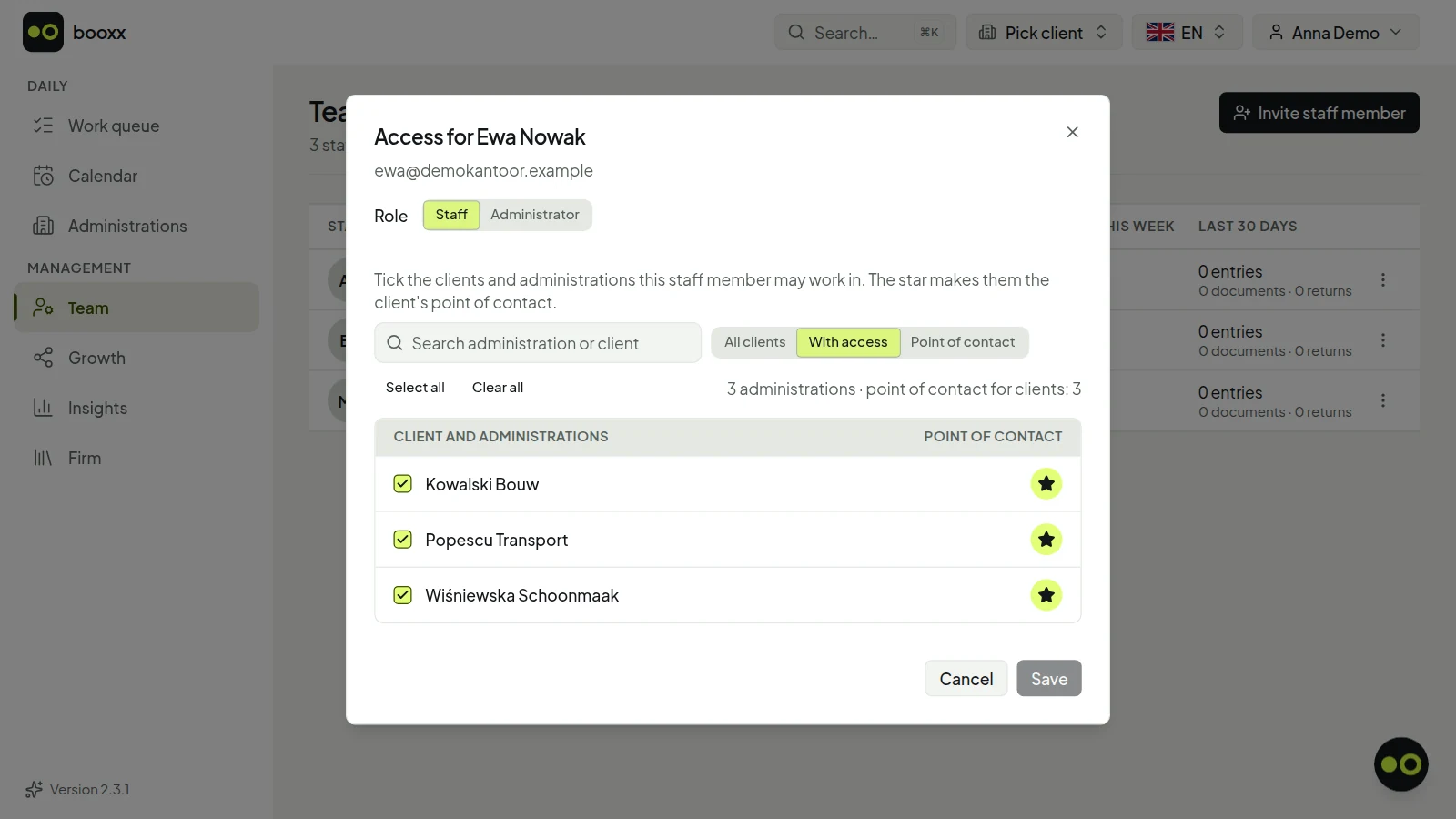
Every staff member logs in with their own account; bookings, returns and processed documents are recorded under their name. Per staff member you tick the clients and administrations they may work in, and the star marks the clients they are the point of contact for; Team shows how much work is on everyone's desk.
Firm defaults that carry through
Chart of accounts, journals, VAT codes and whether payment reminders are switched on are set once at firm level. Every new client starts with them, and a client who needs something of his own deviates without the rest shifting.
Questions to your client, on his screen
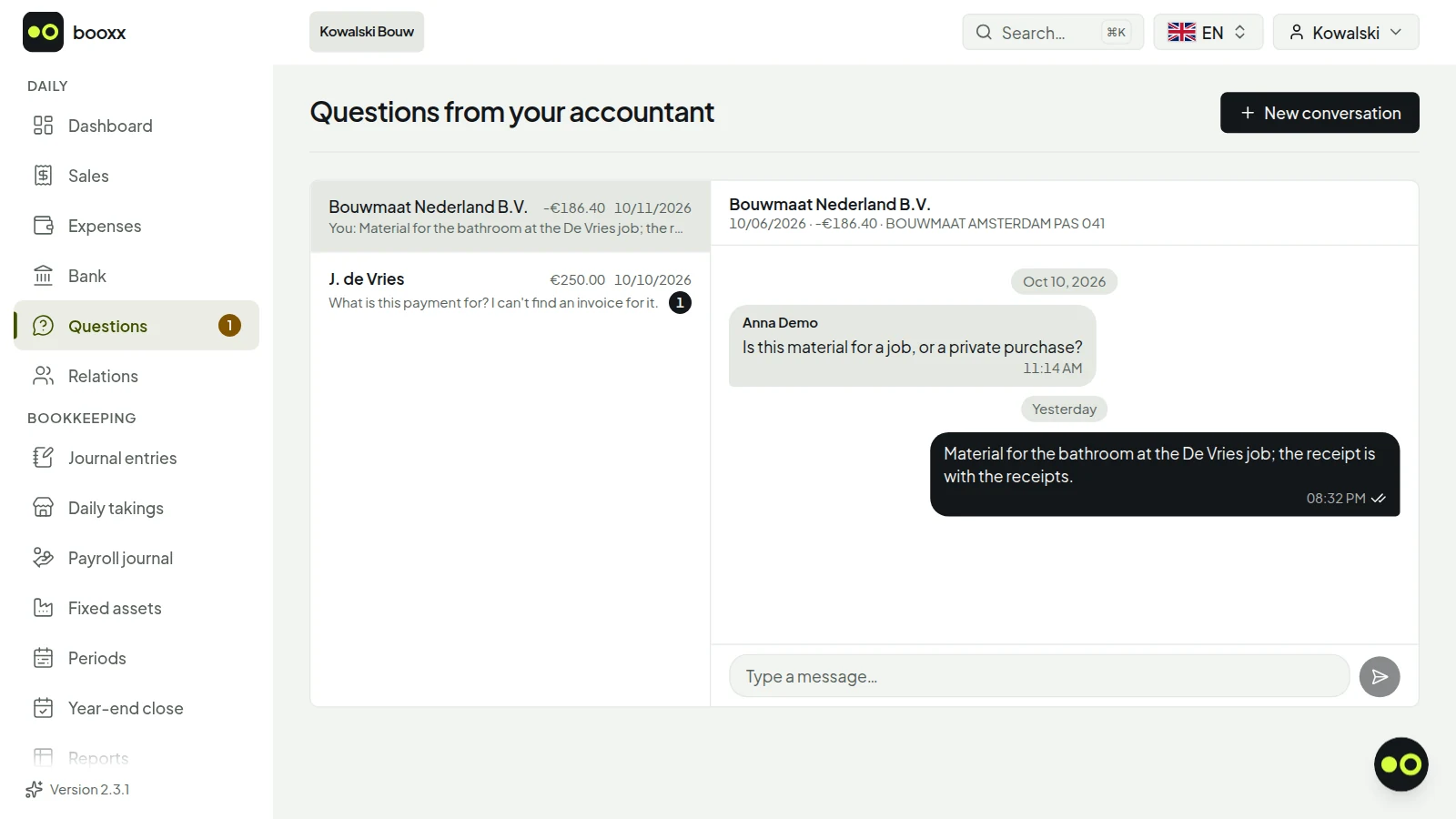
If you can't place a bank transaction, you ask the client about it. He sees the question on his dashboard, in a screen in his own language, and answers there; you close it once the transaction is booked.
Switching with the audit file
You create a new client from the XAF audit file of his previous software, so the ledger and opening balance are there straight away. The payroll journal from your payroll software is imported each month as a CSV or Excel file.
Monthly insight
How many administrations are in order, what share of the returns was filed on time, how long a document or bank line stayed waiting, and what was matched and recognised automatically — converted to hours using your own firm's standard times.
Access per staff member: you tick the clients and administrations someone may work in, and the star makes them the point of contact for that client. Screenshot with demo data.
Access per staff member: you tick the clients and administrations someone may work in, and the star makes them the point of contact for that client. Screenshot with demo data.
How do you work through the same task for all your clients, one after another?
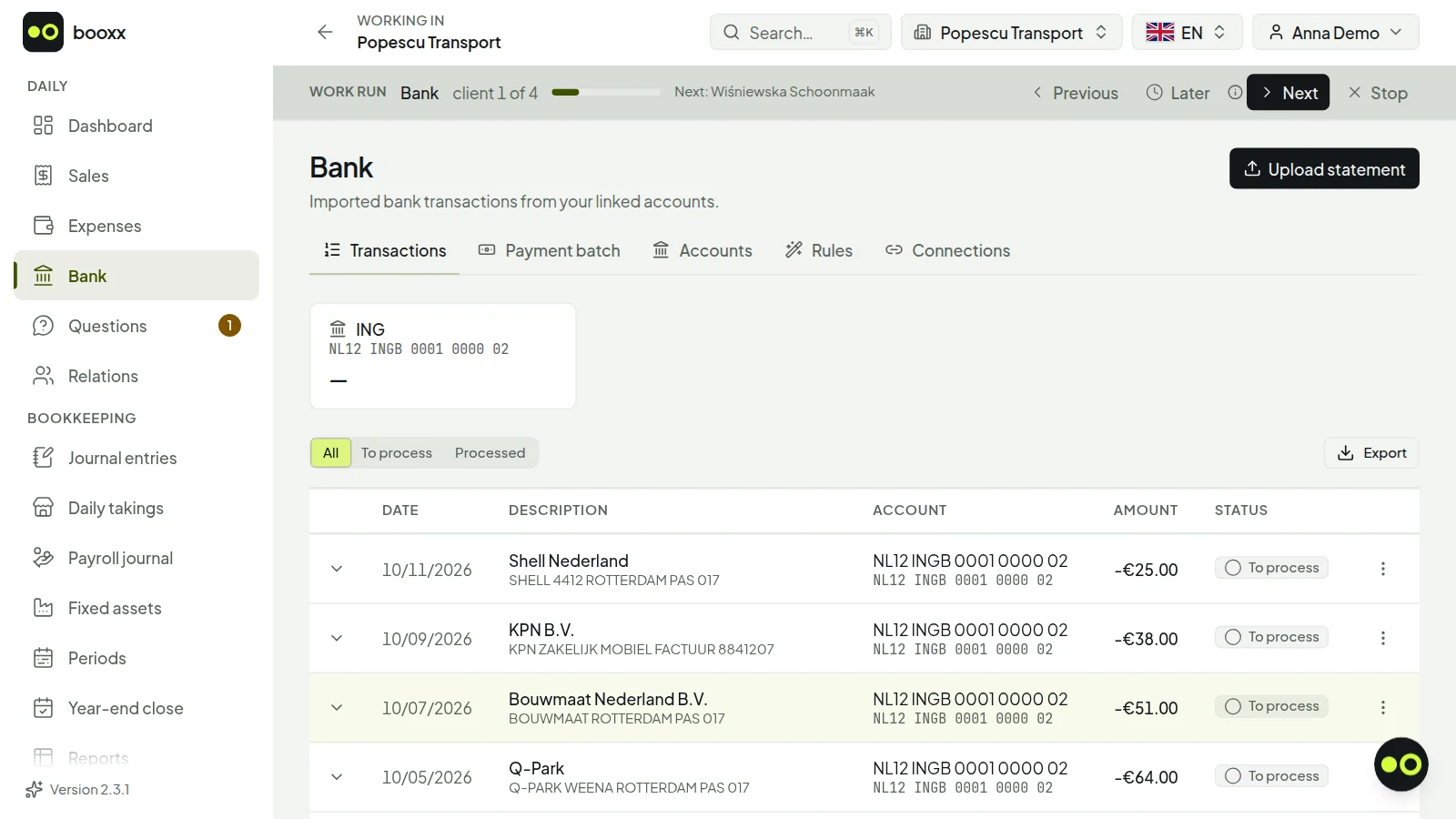
With a work run. You choose the work you want to do — reconciling the bank, checking documents, the VAT return, the reconciliation checks or the open queries — and the software lines up every administration where that work is waiting, most urgent first or by name. You finish the first one and press Next to do the same task for the next client, without going back to the list. A client you cannot finish right now goes to the back of the line with Later.
A work run over the bank: you are in the administration of the first of four clients, and Next takes you to the bank of the next one. Screenshot with demo data.
A work run over the bank: you are in the administration of the first of four clients, and Next takes you to the bank of the next one. Screenshot with demo data.
The line follows your filter
A work run covers whatever is in your worklist at that moment: all administrations, only those you are the point of contact for, a search term, or a handful of administrations you ticked yourself.
What a colleague already did is skipped
If a colleague clears the bank of a client further down your line in the meantime, Next skips that client and tells you. So you never redo work that is already done.
The calendar shows what is coming
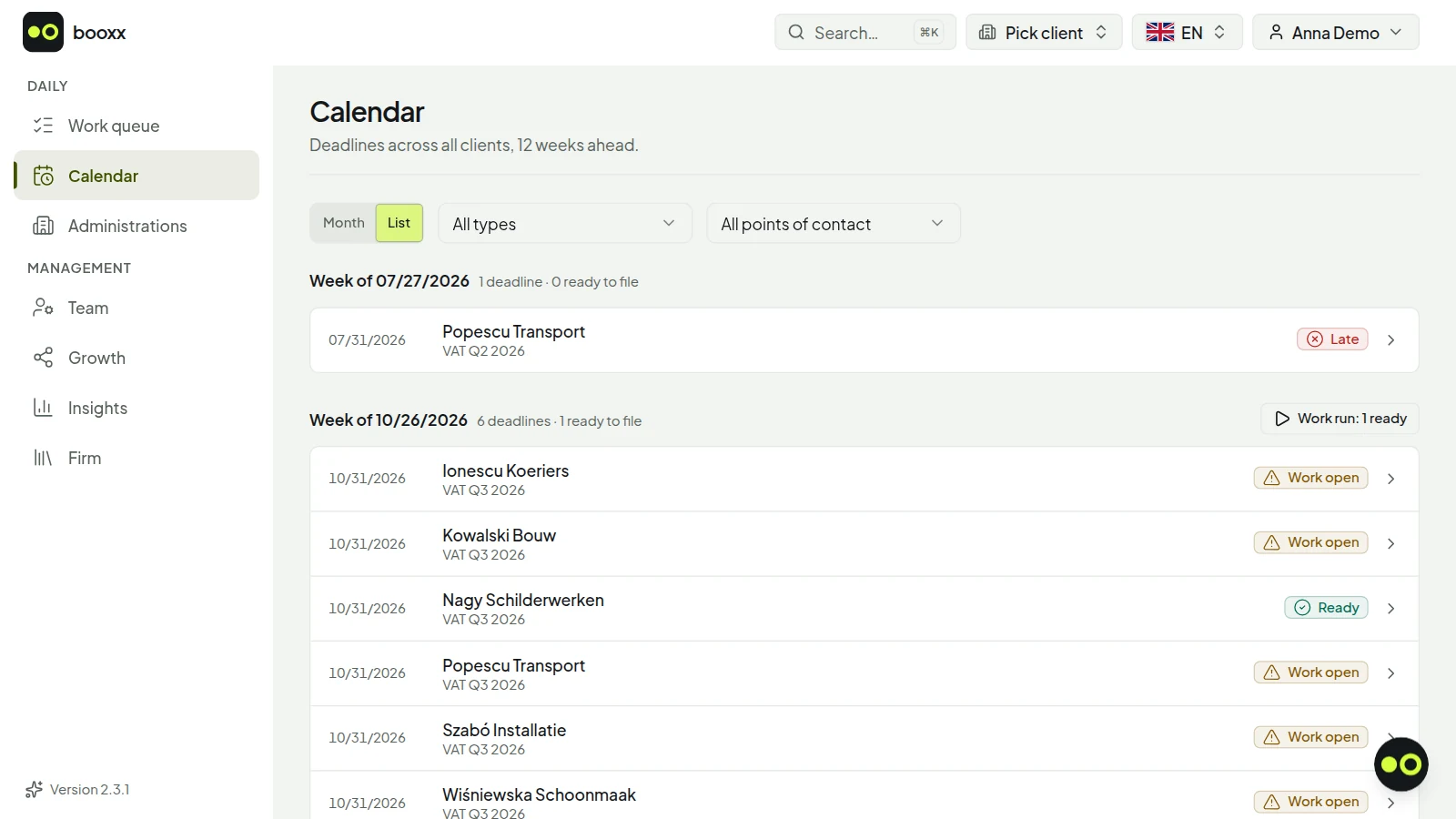
Next to the worklist there is a calendar, by month or by week: the VAT deadlines, the trials that are ending and the administrations that are closing. For each week you see how many returns are ready, because no bank transactions, documents or red checks are left open in that administration, and you start a work run over exactly those clients.
The calendar as a list, with six sample clients: the VAT deadlines per week, and per client whether work is still open. One client has nothing left open; from here you start a work run over such clients. Screenshot with demo data.
The calendar as a list, with six sample clients: the VAT deadlines per week, and per client whether work is still open. One client has nothing left open; from here you start a work run over such clients. Screenshot with demo data.
Three ways to work together
Your firm runs the administration
You create the client in your firm environment and your firm pays per managed administration: from €9 a month, excluding VAT. The rate per administration goes down the more you run; the lowest rate applies to large firms. There is no fixed firm fee and no price per staff member. What you charge your client is up to you.
Your client gives you access as Bookkeeper
If your client has his own subscription, he invites you under Team with the Bookkeeper role. That costs neither you nor him anything extra. With one login you switch between all your clients; you book, manage the ledger, prepare the VAT return and put periods up for review. Team, subscription and payments stay with the client.
You refer clients
An entrepreneur who wants to do his own bookkeeping signs up through your firm's referral link and takes out his own subscription. Your firm receives a recurring share of what he pays, for as long as he stays a customer. You only see his books if he gives you permission.
This is how your client sees your question: next to the bank transaction, on a screen in their own language, with a field to answer. You then see the answer in your worklist. Screenshot with demo data.
This is how your client sees your question: next to the bank transaction, on a screen in their own language, with a field to answer. You then see the answer in your worklist. Screenshot with demo data.
How to start
Email us your firm's name, roughly how many clients you have and in which languages. We set up your firm environment and you get an administrator account.
You set your firm defaults: chart of accounts, journals, VAT codes and whether payment reminders are switched on.
You create your clients, empty or from the audit file of their previous software, and pick a point of contact for each.
You invite the client into his own administration. He takes part in his own language — emailing receipts, answering questions — and you see in the worklist what comes in.
How does an accounting firm work in other packages?
Every package settles differently who takes the subscription: the client, the firm, or either one. That decides who gets the invoice and who controls the administration, so check it before you choose. Below is what eight Dutch packages say about it on their own page for firms. We do not quote rates; those are on the vendor's own site.
Per package: who takes the subscription, and what the firm needs
Moneybird
Free for accountants, tax advisers and bookkeeping firms, with unlimited administrations and staff in the firm environment. The business owner is Moneybird's customer and takes the subscription; the firm gets access to their administration.
e-Boekhouden.nl
Two ways. If the firm creates the administration in its accountant environment, the invoice goes to the firm and it costs the client nothing. If the client creates their own account and links the firm, the subscription runs through the client. Adding colleagues is free and unlimited.
Jortt
The firm takes a bookkeeper portal for a monthly amount and needs a beconnummer (the Dutch number for tax advisers and bookkeeping firms) for it. Every client the firm registers in the portal is a paid subscription straight away, at a rate per administration; the client gets access to their own administration at no extra cost. There is no minimum purchase.
MoneyMonk
A bookkeeper portal in which the firm works in its clients' administrations. The firm can buy licences itself and receives the invoice for them. Those licences carry a minimum amount per month, which a bookkeeper who is just starting does not have to reach in the first year.
SnelStart
The firm works in a package of its own; the first two users are included. The client gets their own licence for a package of their choice: only delivering data digitally, or also invoicing and doing part of the bookkeeping themselves. When signing the client up, the firm chooses who receives the invoice for it: the business owner or the firm.
Twinfield
The firm takes the subscription itself, the Accountancyregeling (accountancy scheme), and pays a tiered price per administration. There is a minimum entry rate, calculated over twenty internal administrations. How the client gets access is not stated on this page.
AFAS SB
The firm pays a fixed amount per month and decides the client's roles, permissions and access itself. For a business that works with AFAS SB through its accountant, other rates apply than the regular price; it asks its accountant for them.
Nmbrs Accounting (formerly Yuki)
The firm takes a fixed base licence for the Portal, with an unlimited number of users, and on top of that pays a rate per administration. Every client gets its own domain and database.
Taken from each package's own page for bookkeepers and firms on October 13, 2026. None of these eight pages mentions a screen in Polish, Hungarian or Romanian.
Here both ways are possible. If your firm keeps the books, your firm pays per managed administration, from €9 a month excluding VAT; if your client has their own subscription, they invite you as Bookkeeper at no cost. What we add: your client's screen is in Polish, Hungarian, Romanian or English, down to the names of the ledger accounts. What you cannot do here: create a firm environment yourself. You request it by email and we set it up with you.
How do you move a client over from other accounting software?
With the XAF audit file from their previous software. When you create the client you import the file, and booxx proposes an account in the new chart for every old ledger account: first by RGS reference code, then by VAT role and by number plus description. Whatever is still open, the app passes to the AI assistant; if nothing fits well enough, the line stays empty and you map it yourself. Each line shows where the proposal came from, and nothing is booked until you confirm.
Where you create that file in Twinfield, AFAS, SnelStart, Moneybird, e-Boekhouden.nl, Jortt, MoneyMonk, Rompslomp and Nmbrs Accounting (formerly Yuki) is listed per package in the guide below, with the menu path from their own help page.
If the audit file contains VAT codes, you map them to the VAT codes in the software, with a proposal based on code and observed rate. The imported entries keep their VAT code and taxable amount, and you prepare the VAT return for the period in which the switch falls in full in booxx.
Open items rebuilt
Every invoice on the receivables or payables account becomes an opening item, and payments are matched against it by the invoice number the previous software put in the description. Anything that cannot be tied to an invoice or a relation becomes one item on sundry debtors or sundry creditors, so the list reconciles with the ledger.
Only the accounts the client used
By default only the ledger accounts that are used in the file go into the working chart, plus the system accounts needed for booking. If the opening balance does not balance, the import books one balancing entry to equity.
What you still do yourself afterwards
An audit file contains no asset register: you re-enter fixed assets with their purchase value and the amount already depreciated, and the completion checklist reminds you. Not every package puts VAT codes in its audit file; if they are missing, the VAT amounts still land on the ledger accounts, but without a taxable amount per line.
Explanations for your client, in their own language
Need to explain to a Polish, Hungarian or Romanian client how the VAT return works, what reverse-charged VAT means or which records they have to keep? Send them the link. These guides cover the Dutch rules and are available in Polish, Hungarian, Romanian and English. Neither you nor your client has to be a booxx customer to use them.
Does your client work in booxx too? Send them the guide on making invoices, sending in receipts and answering your questions, in their own language:Polski · Magyar · Română · English
Guides by topic, in Polish, Hungarian, Romanian and English
Every guide has the same structure in all five languages, Dutch included. So you know what your client is reading.
What the software doesn't do for you
There is no payroll in it: you run wages in your own payroll software and book the payroll journal here. The VAT worksheet is ready with the boxes of the Dutch tax office (Belastingdienst), but you file it yourself, in Mijn Belastingdienst Zakelijk or through your own filing channel. And the automatic bank connection is in development: for now you import bank statements as MT940 or CAMT files.
Questions from firms
Which languages does the software work in for a firm and its clients?
Dutch, English, Polish, Hungarian and Romanian. Every user picks their own language, so your staff member and your client look at the same administration in their own language. The bookkeeping underneath is Dutch: RGS ledger, the VAT boxes of the Dutch tax office (Belastingdienst), XAF audit file.
I'm an independent accountant with a few clients. Do I need a firm environment?
No. If your client has his own subscription, he invites you with the Bookkeeper role; that costs nothing extra, for you either. With one login you switch between your clients and do the bookkeeping there: booking, the ledger, the VAT return, putting periods up for review and reopening them. You only need a firm environment if you want to run the administrations yourself, with one worklist across all your clients and permissions per staff member.
Can I keep several sets of books in one accounting program?
Yes. As a bookkeeper you switch between the books of all your clients with one login, and an accounting firm runs them from a single work list sorted by urgency. Each set of books keeps its own ledger, its own journals, its own VAT return and its own annual accounts; nothing carries over from one to the other. A business owner with, say, a sole proprietorship next to a BV also runs both under one login, with a subscription per set of books.
What does it cost for an accounting firm?
From €9 per managed administration per month, excluding VAT. The rate per administration goes down the more your firm runs: that lowest amount applies to large numbers of administrations, and a smaller firm pays more per administration. There is no fixed firm fee and no price per staff member. Email us the number of administrations and you will know the rate for your firm before you start.
Can a client who already uses the software move to my firm?
Yes, if he signed up through your firm's referral link and agrees. Your firm offers the switch and the owner of the administration accepts or declines. After the transfer your firm runs the administration and pays for it. A client who signed up without your link invites you with the Bookkeeper role.
Can my client issue invoices and send in receipts himself while we do the bookkeeping and the VAT return?
Yes, that is the intended split. Your client creates his sales invoices in the package and emails or photographs his receipts and purchase invoices, in his own language. Your firm checks and books them, reconciles the bank and prepares the VAT return with the boxes of the Dutch tax office (Belastingdienst); you file it in Mijn Belastingdienst Zakelijk or through your own filing channel. If you cannot place a bank transaction, you ask your client about it on his own screen.
Can we use our own chart of accounts for new clients?
Yes. Your firm gets its own copy of the booxx charts of accounts: the full standard chart and a small starter chart per legal form. You adjust those, or you add a chart of your own. Under Firm, in Defaults for new clients, you also set the journals, the bookkeeping settings and the VAT codes a new client starts with; only a firm administrator can open that screen. Every account links to the Dutch reference chart of accounts (RGS), and that link decides whether it belongs on the balance sheet or in the profit and loss account. What you change applies to clients you create afterwards; an existing client keeps their own setup. If you move a client over with an audit file, by default only the accounts used in that file go into their working chart.
What if a client stops, or is idle for part of the year?
Then you put the client on hold, until a set date if you like. Nothing is deleted: the client can still view and export everything but can no longer post, and their administrations drop out of your work queue. With an end date the client resumes by itself on that day. If a client leaves, you first create the export bundle: one ZIP with all entries, invoices, receipts and attachments, for the client to take along, which stays available for download for 48 hours. Then you delete the client; that is only possible once the bundle exists and no paid subscription is still running. If only one of their administrations stops, you close it: it ends on a date and is removed after the retention period. Putting a client on hold, closing and deleting are done by an Administrator of the firm.
Want to see how the package handles the books first? Start a trial with your own firm's administration. You then see the package the way your client sees it; for the firm environment with the worklist, send us an email.