You in your own language. Your accountant in Dutch.
One set of books, two screens: you create your invoices and answer questions in English, Polish, Hungarian or Romanian, and your accountant books and prepares the VAT return in the same books, in Dutch. Inviting them costs nothing extra.
90 days free · no payment method needed · cancel monthly afterwards
Which accounting software can you use together with your accountant?
Software in which your accountant works directly in your administration, so you don't send files or receipts back and forth. In booxx you invite your accountant under Team with the Bookkeeper role; that costs nothing extra, and you can invite more than one. They book, manage the ledger, prepare the VAT return and put periods up for review, while you create invoices and forward your receipts by email. Every user picks their own language out of five: Dutch, English, Polish, Hungarian or Romanian. So your accountant works in Dutch and you in your own language, on the same figures.
Want to check with your accountant first?
Send them the guide for bookkeepers. It explains what they can do in your administration, and that it costs them nothing.
Create and send invoices, in your customer's language
Forward receipts and purchase invoices by email
Answer your accountant's questions, on your own screen
Manage your team and your subscription
Make payments: those always stay with you
Your accountant
Book entries and manage the ledger
Prepare the VAT return
Put periods up for review and reopen them
Read the audit log: who booked what, and when
Ask you a question about a bank transaction
How your accountant gets access
1Go to TeamChoose 'Invite team member' and enter your accountant's name and email address.
2Choose the Bookkeeper roleIf you have more than one administration, you choose right away which ones they may work in.
3They receive an emailIf they don't have an account yet, they set a password. If they already have one, your administration is added to it.
4They work in your administrationIn their own language, with one login for all their clients.
You withdraw access in the same overview, with 'Withdraw access'. It takes effect immediately.
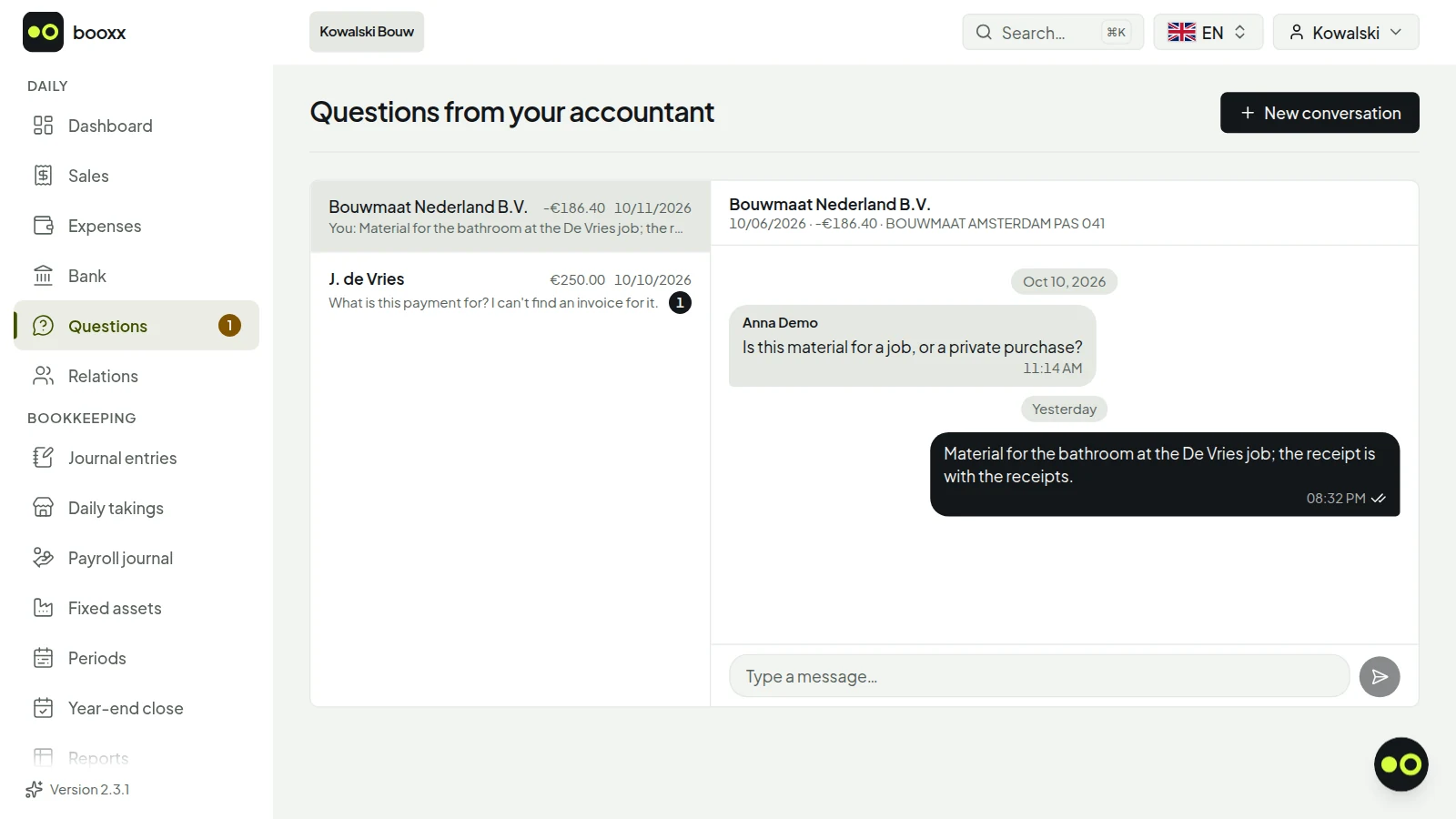
If your accountant can't place a bank transaction, they ask you a question. You see it on your dashboard and answer in your own language. Screenshot with demo data.
If your accountant can't place a bank transaction, they ask you a question. You see it on your dashboard and answer in your own language. Screenshot with demo data.
Does your accountant use other software?
Then they don't need to switch. Under Reports you download the audit file (XAF) for a financial year: the complete journal in the standard format for Dutch books, as XAF 4.0 or 3.2. Whether your accountant's software reads that file in differs per package and per version: see the table below. For the income tax or corporate tax return there is the tax software export, an RGS bridge statement for Nextens, Avanzer Aangifte or Fiscaal-online.nl. You keep your invoices and receipts in your own language, and your accountant gets the figures in the form they know.
What your accountant's software does with an audit file from another package, according to its own help pages:
What your accountant's software does with an audit file from another package, according to its own help pages:
SnelStart
According to its own knowledge base, it does not read in another package's export (or an .xaf audit file) and names an external service that can. Importing entries does work, from an Excel file.
Moneybird
Does not mention the audit file. According to the help centre, importing existing books in one go is not possible: you start with an opening balance or enter old data retroactively.
Nmbrs Accounting (formerly Yuki)
Reads in historical data from before the start date from the XAF audit file (version 3.0 onward) of almost any accounting package.
AFAS SB
Reads in an audit file (XAF 3.2 or 4.0) when a new administration is started and names Profit, Twinfield, Exact Online, Multivers and SnelStart for that; according to AFAS other packages will follow later. It reads in comparative figures from any package that exports XAF 3.2.
Caseware Cloud
Reads in XAF 3.1 or 3.2, so choose XAF 3.2 when you download.
Taken from each package's own help pages on October 11, 2026. If your accountant's software is not listed, we could not verify it at the source: ask them what their software reads in.
An audit file is a snapshot of one financial year: you don't keep a second set of books with it during the year. If your accountant wants to follow along or post entries through the year, that is simplest inside booxx itself: you invite them with the Bookkeeper role, it costs nothing extra, for them either, and they choose their own language while you keep yours.
Can your accountant work with you in other software too?
Yes. In all six packages we compare, your accountant can work in your administration. With Moneybird they do not count towards your user limit, with e-Boekhouden and MoneyMonk their access is free according to their own sites, and with eFaktura.nl the connection with your accountant is included in every plan. In booxx you and your accountant work in the same administration, each in your own language, and they cost nothing extra.
Can your accountant work with you in other software too?
booxx
Yes, free with the Bookkeeper role; each of you works in your own language
Taken from each package's own website on October 9, 2026. The name links to the full comparison.
Looking for an accountant who speaks your language?
There are bookkeepers and accounting firms in the Netherlands that speak Polish, Hungarian or Romanian. But you don't have to choose your accountant by language: in booxx you read your books in your own language while your accountant works in Dutch, in the same books. So choose them for what they know and what they do for you. Before you choose, ask:
Do they file your VAT return and your income tax return, and what is included in the price?
Do they know the rules that apply to you, such as the VAT reverse charge in construction, the hours criterion (urencriterium) or the small business scheme (KOR)?
Do they work directly in your books, or do they want a pile of receipts and statements every quarter?
Can you see your own figures between two returns, in a language you read?
What qualifications do they have, and are they a member of a professional association?
What your accountant doesn't do
Your accountant doesn't manage your team or your subscription and doesn't send payments; that stays with you as the owner. The VAT return is ready with the boxes of the Dutch Belastingdienst, but filing happens outside the software: in Mijn Belastingdienst Zakelijk, or through your accountant's own filing channel. And the Bookkeeper role is for business owners with their own subscription. If an accounting firm runs your administration, that firm decides who has access.
Are you an accountant yourself?
If a client invites you, it costs you nothing: with one login you switch between all your clients, and you only confirm your email address before working in an administration. If you would rather run the administrations yourself, with one worklist across all your clients and permissions per employee, there is the firm environment.
Does it cost extra if my accountant works in my administration?
No. An accountant you invite yourself with the Bookkeeper role costs nothing extra, for them either. There is no limit on the number of team members and no price per user, so you can also invite more than one accountant.
Can my accountant work in Dutch while I use English, Polish, Hungarian or Romanian?
Yes. Every user picks their own language with the language switcher at the top right, and that choice belongs to their account. Your accountant sees your books in Dutch; you see the same entries in English, Polish, Hungarian or Romanian, down to the names of the standard ledger accounts.
Does my accountant need to speak my language?
No. In booxx every user picks their own language, so you read your books in your own language and your accountant works in Dutch, on the same figures. An accountant who speaks your language makes a conversation easier, but the bookkeeping itself doesn't need it. Choose them for what they know about Dutch taxes and what they do for you.
What can my accountant do, and what not?
They book entries, manage the ledger, prepare the VAT return, put periods up for review and reopen them, and can read the audit log. They don't manage your team or your subscription and don't send payments; that stays with you as the owner.
My accountant uses other software. Can I still keep my own books in my own language?
Yes. You send them the audit file (XAF) for the year, the standard format for Dutch books, or the tax software export for their tax return software (Nextens, Avanzer Aangifte or Fiscaal-online.nl). They don't need an account themselves.
How do I withdraw my accountant's access?
Under Team, choose 'Withdraw access' in the three-dot menu next to your accountant. It takes effect immediately. Their own account remains; they just can no longer get into your administration.
Create a set of books, send your first invoice and see whether it works for you. The first 90 days are free and no payment method is asked for, so there is nothing to cancel later.