For clients of a firm

Your firm keeps the books, you invoice: how you work together

If your bookkeeping firm works in booxx, you do three things: make invoices, send in receipts and purchase invoices, and answer your firm's questions. You do it in your own language. The bookkeeping and the VAT return are done by your firm.

In short

If your bookkeeping firm works in booxx, you make your sales invoices and send in your receipts and purchase invoices. Your firm checks and books them, reconciles the bank and prepares the VAT return. You work in Dutch, English, Polish, Hungarian or Romanian: you choose the language yourself, and your firm works in the same administration in its own language. If your firm cannot place a payment, it asks you a question on your own screen and you answer there.

The essentials

You
Make and send invoices, send in receipts and purchase invoices, answer your firm's questions.
Your firm
Checks and books, reconciles the bank, prepares and files the VAT return.
Language
Dutch, English, Polish, Hungarian or Romanian. Every user chooses their own language; by default your invoice gets your customer's preferred language.

How do you get into booxx?

Your firm sets up your administration and invites you. You get an email with a link to set your own password; that email comes in the language your firm works in. After that you log in on your computer or in the browser on your phone. On a phone you can also add booxx to your home screen, so it opens like an app.

You choose the language yourself: on the login screen, or later with the flag at the top right (on a phone, in the menu under your name). You can choose Dutch, English, Polish, Hungarian or Romanian. The choice applies only to you: your firm works in the same administration in its own language.

What you see depends on the role your firm gives you. As a User you see the Dashboard, Sales, Expenses, Relations and Questions. As an Owner you also see the bank and the bookkeeping screens, and you can book entries yourself. Agree on this with your firm.

How do you make and send an invoice?

Under Sales you choose New. You pick your customer, add the lines with a VAT code on each line, and see straight away on the right what the invoice looks like. With Send it goes to your customer by email, as a PDF, and as an e-invoice (UBL) where possible. The invoice is booked when it is sent; your firm doesn't need to do anything for that.

The language of the invoice is separate from the language you work in. It follows your customer's preferred language, and if they have none, it is Dutch. You can still change it when you send: Dutch, English, Polish, Hungarian or Romanian. Without your name, address and IBAN no invoice goes out; ask your firm to fill them in if they are missing.
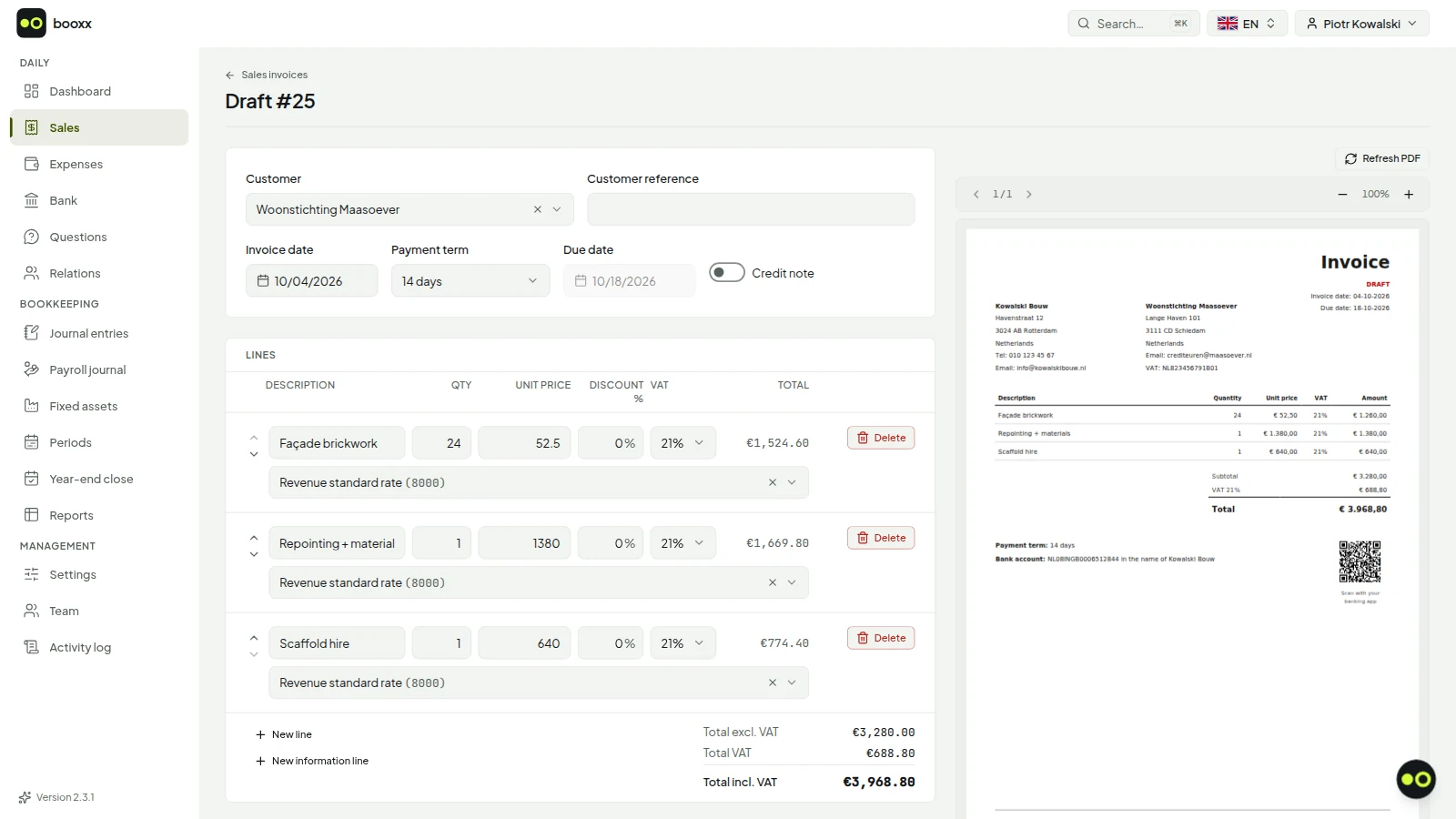
Screen for creating a sales invoice, with lines, a VAT code per line and the invoice total.
Creating an invoice. The VAT code per line decides which box it lands in on your return.

How do you send in receipts and purchase invoices?

Your administration has its own email address for purchase invoices. You find it under Expenses, at Invoices, after 'Incoming invoices to', with a button to copy it; your firm can also give it to you. Have your suppliers send their invoices straight to that address, or forward them yourself. A PDF you already have goes in with Upload PDF.

You photograph a till receipt on the Receipts screen, with Add receipt. On an Android phone you can also use Share, from your gallery, WhatsApp or your email, once you have added booxx to your home screen. Then booxx reads what is on it: supplier or shop, date, amount and VAT. You don't have to book anything: what comes in is waiting for your firm to check and book.

From receipt to VAT return

  1. You send it inA photo of the receipt, a PDF, or an email to your administration's address.
  2. Read by booxxDate, amount, VAT and supplier or shop are filled in as a suggestion.
  3. Your firm checks and booksThe document sits in your firm's work queue until it has been checked and booked.
  4. Your firm does the VAT returnThe worksheet is ready with the boxes of the Dutch tax office; your firm files it.
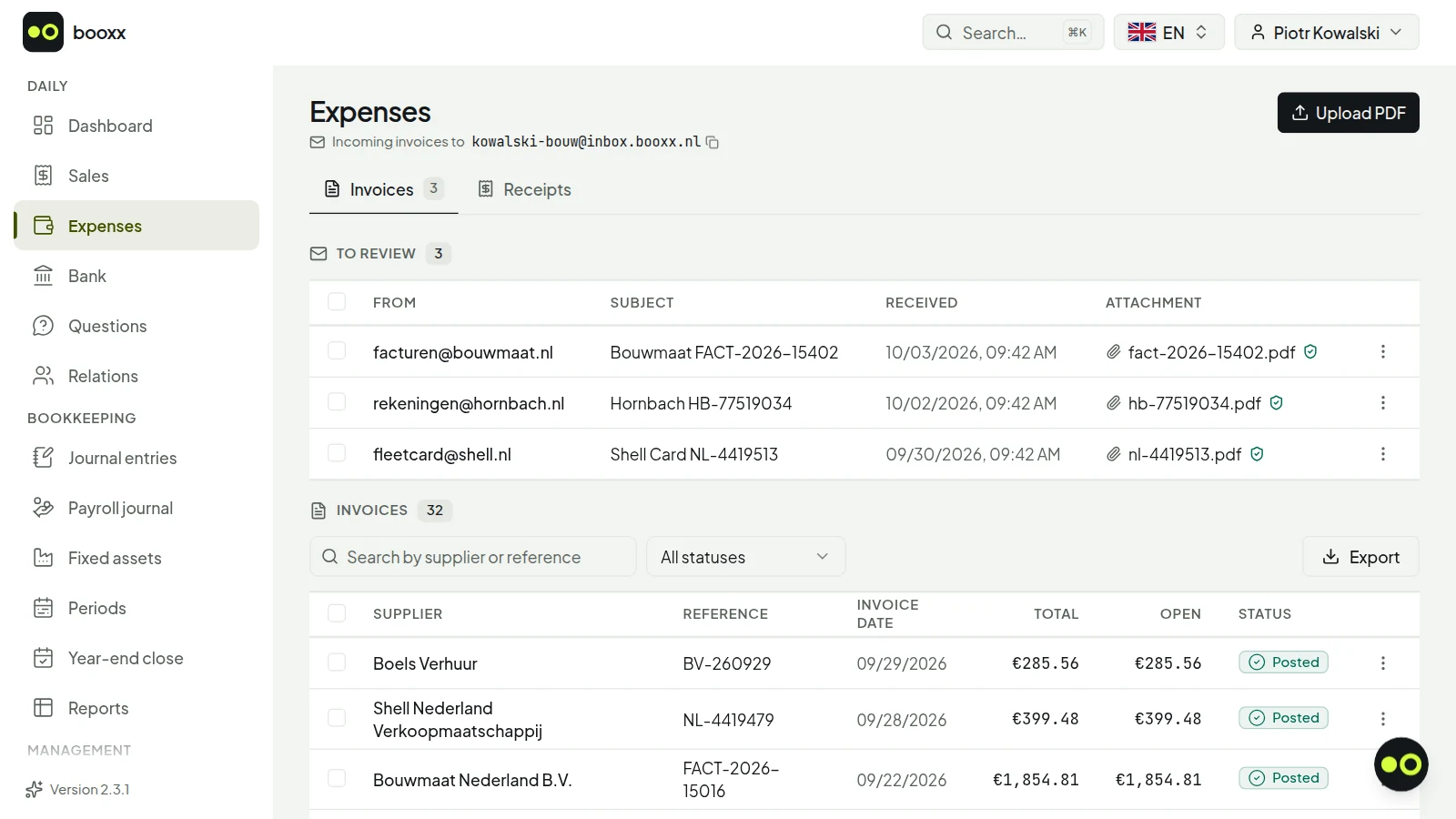
You don't have to book anything yourself. A question about a receipt or payment reaches you on your own screen, under Questions.
The purchase inbox with incoming invoices and the details read out of them automatically.
The purchase inbox: forwarded invoices arrive here with the entry already filled in.

How do you answer a question from your firm?

If your firm cannot place a payment on your bank account, it asks you about it. You see this from a counter at Questions in the menu and a tile on your dashboard. The conversation works like a chat: at the top it shows which payment it is about, with date, amount and description, and at the bottom you type your answer.

As long as your firm wrote last, the conversation shows Waiting for you on your side; just reading is not an answer. Once everything is clear, your firm resolves the conversation. If you want to ask something yourself, for example whether you can deduct a purchase, you start with New conversation.
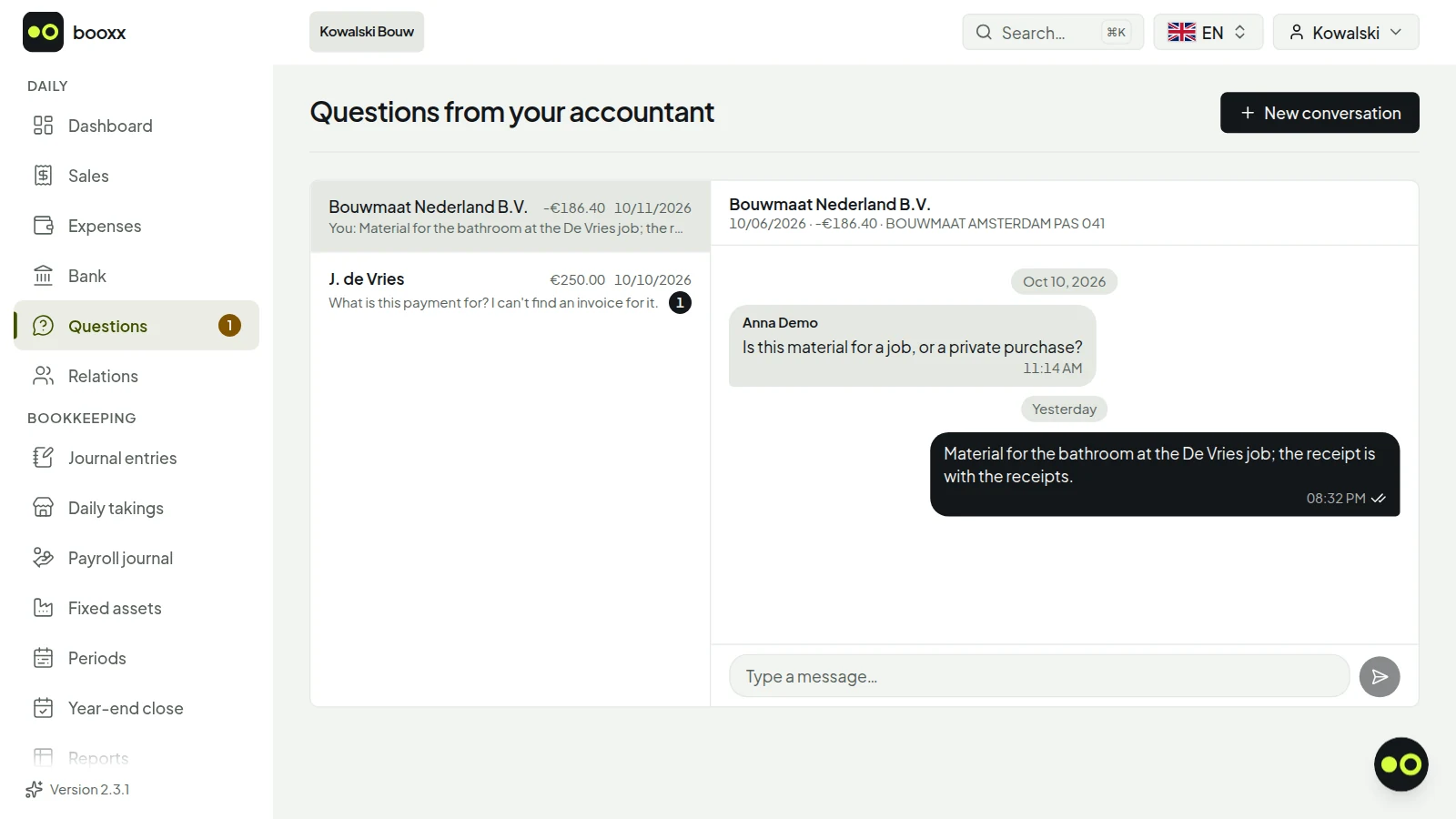
The client's Questions from your accountant screen: an open question from the firm about a 250 euro payment received, and an answered question about a building-supplies purchase.
This is how you see a question from your firm: next to the payment it is about, on a screen in your own language, with a field to answer. Screenshot with demo data.

Working in the firm workspace

What do you do, and what does your firm do?

You supply what only you have: your invoices, your receipts and your answers. Your firm does the bookkeeping: checking, booking, reconciling the bank and the VAT return. Your firm files in Mijn Belastingdienst Zakelijk or with its own filing software, and then records in booxx that the return has been filed.

Who does what

YouYour firm
InvoicesMake and send them, by default in your customer's language.Sees them in the books.
Receipts and purchase invoicesSend them in: photo, PDF or email.Checks and books them.
BankAnswer a question if a payment is unclear.Matches payments to invoices and receipts.
VAT returnNothing, apart from answering your firm's questions.Prepares, files and records it.
With the Owner role you can also book yourself. Agree with your firm who does what, so nothing gets booked twice.

Updated October 2, 2026. General explanation of the Dutch rules, not tax advice — for your own situation, decide together with your accountant or the Dutch Tax Administration.

Frequently asked questions

Do I need to know bookkeeping if my firm works in booxx?

No. You make your invoices and send in your receipts and purchase invoices; your firm checks and books them and does the VAT return. If your firm can't place something, it asks you a question on your own screen.

Can I use booxx in Polish, Hungarian or Romanian while my firm works in Dutch?

Yes. Every user chooses their own language: Dutch, English, Polish, Hungarian or Romanian. You see the administration in your language, your firm sees the same administration in its own.

In which language does my customer get the invoice?

In that customer's preferred language, or in Dutch if they have none. When you send it you can choose another: Dutch, English, Polish, Hungarian or Romanian. The language of the invoice is separate from the language you work in.

What does booxx cost me if my firm manages my administration?

You pay booxx nothing: your firm pays for each administration it manages. What you pay your firm is something you agree with your firm. You also have no subscription of your own and no trial period.

Who files the VAT return?

Your firm. The worksheet is ready in booxx with the boxes of the Dutch tax office; your firm files it, in Mijn Belastingdienst Zakelijk or with its own filing software, and then records in booxx that it has been filed.

Is there an app for my phone?

You use booxx in your phone's browser, and you can add it to your home screen, so it opens like an app. On an Android phone you can then share a receipt straight from your gallery or WhatsApp. There is no app in the App Store or Google Play.

GuidesAccounting software that speaks your language

booxx.nlYour books, in your own language

Try it first with your own firm's books

Want to see how the package handles the books first? Start a trial with your own firm's administration. You then see the package the way your client sees it; for the firm environment with the worklist, send us an email.

90 days free · no payment method needed · cancel monthly afterwards

From €9 per managed administration per month, excluding VAT. No fixed firm fee, no price per staff member.

The subjects

Calculators for freelancers

All five free calculators in one place: net income, hourly rate, hours criterion, VAT and KIA, at 2026 rates.

Read on

Freelancer net income calculator

Enter your turnover and costs and see what you keep after Dutch income tax and the Zvw contribution, per year and per month, at 2026 rates.

Read on

Freelancer hourly rate calculator

From the net you want to keep each month to the profit, the turnover and the minimum hourly rate you need to charge, with 2026 Dutch tax included.

Read on

Glossary

Voorlopige aanslag, naheffingsaanslag, btw-id, suppletie: twenty-nine Dutch tax and KvK terms, each explained in two or three sentences.

Read on

What is a zzp'er?

Zzp means self-employed without staff. Not a legal form, but you are an entrepreneur: what that means for registration, tax and bookkeeping.

Read on

Starting a sole proprietorship

Registering with the KvK, your VAT numbers from the Dutch Belastingdienst, and records that are right from your first invoice.

Read on

Becoming a zzp'er from abroad

Registering with the KvK if you do not (yet) live in the Netherlands: when you need a Dutch home address, when the RNI is enough, and what to bring.

Read on

Getting DigiD as a freelancer

With DigiD you register your sole proprietorship with the KvK and log in to Mijn Belastingdienst Zakelijk. How to apply, with a Dutch home address or from abroad.

Read on

eHerkenning: do freelancers need it?

eHerkenning is the business login for the Dutch government. When DigiD is enough for a sole proprietorship, when it isn't, and how to apply.

Read on

Business bank account: required?

Do you need a business bank account as a freelancer in the Netherlands? When it is required, when you may use your personal account, what the bank asks for and whether a foreign account is allowed.

Read on

Insurance for freelancers

Which insurance is compulsory for a zzp'er and which is not: health insurance, disability insurance (compulsory from probably 2030), business and professional liability.

Read on

Bookkeeping yourself or an accountant?

An accountant is not mandatory. When doing it yourself works, when help is wise, and what to do if you don't read Dutch yet.

Read on

Authorising your accountant

How to authorise your accountant at the Dutch Belastingdienst with DigiD or eHerkenning, what the registration letter is and how to withdraw an authorisation.

Read on

VAT in the Netherlands

The 21%, 9% and 0% rates, what is exempt, your two VAT numbers, the quarterly return and the three exceptions: KOR, reverse charge and the EU.

Read on

VAT number and turnover tax number

Your two numbers from the Dutch tax office: the VAT ID for your invoices and the turnover tax number for the Belastingdienst only. What they look like, where to find them and how to check a number.

Read on

VAT return

How often you file, what boxes 1a through 5b mean, and the three mistakes that get made most often.

Read on

Invoice requirements

What must be on your invoice, the deadline for sending it and how long you keep it — the rules of the Dutch Belastingdienst in one place.

Read on

Client does not pay

Payment term, reminder, formal notice, collection costs and statutory interest: what you may charge when an invoice stays open, for businesses and for consumers.

Read on

Small businesses scheme

The € 20,000 threshold, what changes if you join, and the exception that gets missed most often.

Read on

Keeping records

What you must keep for seven years, why digital is allowed, and which file the Belastingdienst asks for during an audit.

Read on

Importing an audit file

Which Dutch accounting package reads in an audit file (XAF) from another package, what the file leaves out, and which version to choose.

Read on

Dutch chart of accounts in English

The chart of accounts a Dutch sole proprietorship starts with, account by account, in Dutch next to English.

Read on

Starting a bookkeeping practice

What you arrange when you start a bookkeeping practice in the Netherlands: KvK, beconnummer, the Wwft and which title you may use.

Read on

Working in the firm workspace

A guide for bookkeeping firms: reading the work queue, doing the same task for every client in a row, planning VAT deadlines and setting permissions per staff member.

Read on

Selling within the EU

Business or consumer is the first question: it decides whether you end up at box 3b and the EC Sales List or at the € 10,000 threshold.

Read on

Reverse charge (btw verlegd)

A subcontractor in construction? You put no VAT on your invoice but 'btw verlegd' — and you get the VAT on your own purchases back.

Read on

Deductible costs for freelancers

Which costs a zzp'er deducts from profit: business costs 100%, mixed costs only the business part, € 0.25 per kilometre, and food, drink and entertainment above the threshold or 80%.

Read on

Tax breaks for freelancers

Self-employed deduction, starter's deduction, SME profit exemption and the KIA: what they are worth in 2026, in which order, with a worked example.

Read on

The hours criterion

The 1,225 hours that decide whether you get the self-employed deduction: which hours count, and why half a year in business does not mean half the hours will do.

Read on

How much tax to set aside

Three pots: VAT, income tax and the Zvw contribution. What goes in each, the 2026 rates, and how to pay monthly instead of all at once.

Read on

Voorlopige aanslag (provisional assessment)

What a voorlopige aanslag is, how to check and change it, until when you can, and why starters should request one themselves.

Read on

Toeslagen (benefits) as a freelancer

Healthcare or rent benefit as a zzp'er: which income you report (not your profit), how to estimate it, and why you check it again with every VAT return.

Read on

Letter from the Belastingdienst

Tax return letter, provisional or final assessment, additional assessment or fine: which letter is which, what to do, and by when.

Read on

Income tax return

When you have to file, when it is merely wise to, and the M-form for the year you moved to the Netherlands.

Read on

Investment deduction (KIA)

28% of what you invest off your profit — but only above €2,901, not under €450 per item, and not on your passenger car.

Read on

Closing your sole proprietorship

Stopping as a zzp'er: deregistering with the KvK, your last VAT return, the cessation profit in your income tax and what you keep for seven years.

Read on